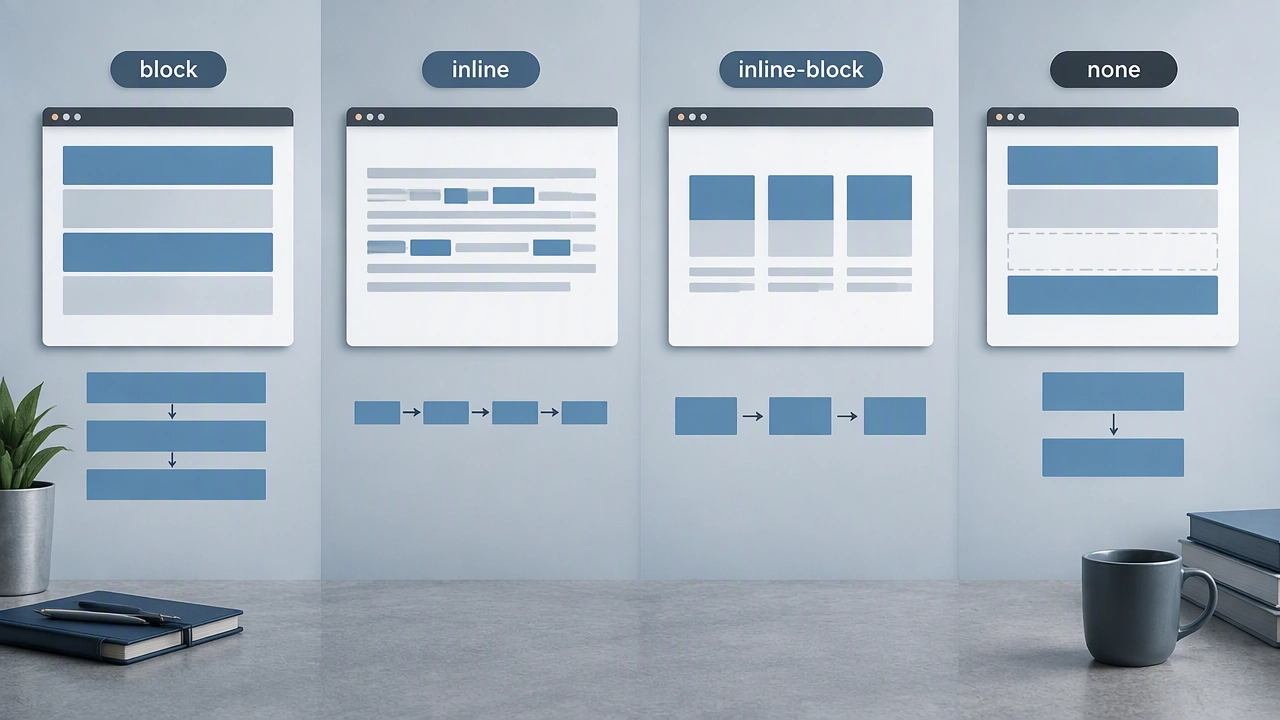
CSS display property block inline explained: what block, inline, inline-block, and none really do to document flow
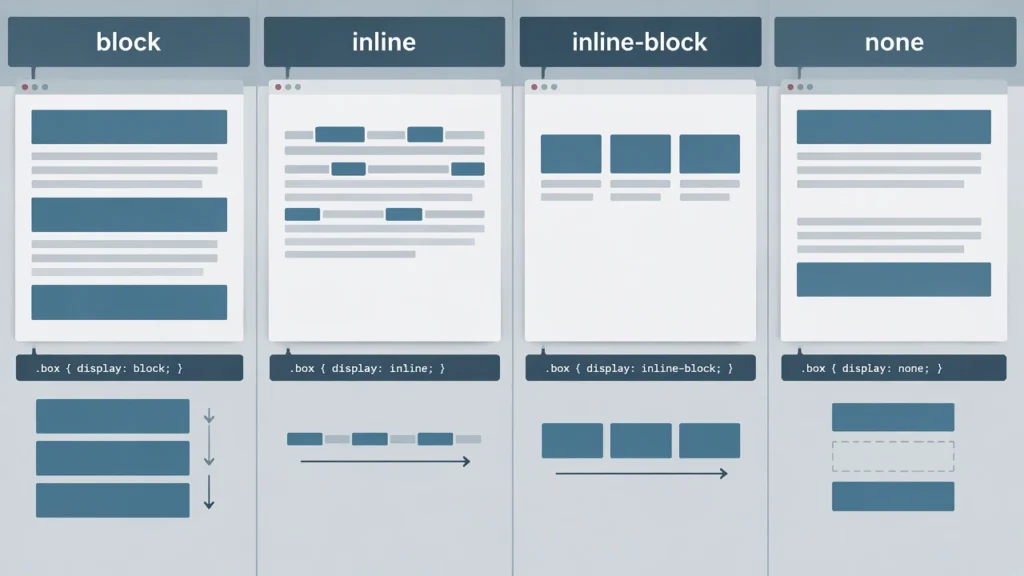
Every web page gets its shape from a few core rules in CSS layout. The most important starting point is the display property. If you have ever wondered why an element stretches across the page, why another sits inside a line of text, or why a third disappears entirely, the answer is almost always display. This article explains what block, inline, inline-block, and none really do to document flow and element behavior, so you can predict how a page will take shape.
The CSS display property block inline explained approach focuses on two things: how an element participates in flow, and how it handles sizing. Flow determines whether the element stacks vertically, flows horizontally with text, or does both. Sizing determines whether width and height apply, whether margins behave symmetrically, and whether the box can become a container for other boxes.
Document flow basics
Normal document flow is the default layout path. Block-level elements stack from top to bottom. Inline-level elements sit inside lines of text and flow from left to right. When you change display, you move an element from one participation model to another. That single change can affect sibling elements, parent sizing, and available space.
Two mental models help: block flow means each box starts on a new line and typically spans the available width; inline flow means the box joins the current line and only takes the space it needs. Inline-block is a hybrid that participates in inline flow but still respects width, height, and block-like internal rules.
Block elements
A block element forms a rectangular box that stacks vertically with other block boxes. By default, its width stretches to fill its containing block. Its height is determined by its content, unless you set a specific height or use techniques that derive height from content.
Key behaviors of block boxes:
- Starts on a new line: A block element forces a line break before and after itself within its parent.
- Full width by default: Without explicit width, the box fills the parent content area.
- Vertical margin collapse: Top and bottom margins can collapse with adjacent block margins in normal flow, which is unique to block layout.
- Container behavior: Block boxes can contain other block boxes or inline boxes, forming nested structure.
Use block display for sections, articles, cards, navigation groups, form groups, and any component that should stack. Even if you keep the element semantic, changing it to display block makes it behave like a structural building block.
Inline elements
An inline element sits inside a line of text and flows with it. It does not start on a new line, and it only takes the space needed for its content plus horizontal padding and borders. This is why width and height usually have no effect on inline boxes.
Key behaviors of inline boxes:
- Flows with text: The box participates in line boxes and wraps across lines if the content is long.
- No block sizing: Width and height are ignored in normal flow. Vertical padding and borders do not push surrounding lines apart.
- Horizontal spacing works: Horizontal margins, padding, and borders apply and shift the box within the line.
- Line box alignment: Vertical alignment is controlled by properties like vertical-align, not by height.
Use inline elements for small text-level runs: links inside a sentence, emphasis, code fragments, or labels that should stay part of the current line.
Inline-block elements
Inline-block is the hybrid. The element participates in inline flow, so it sits next to other inline content and can wrap across lines. At the same time, it behaves like a block box internally: width, height, vertical padding, vertical margins, and borders all work as expected.
Key behaviors of inline-block boxes:
- Joins inline flow: The box participates in line layout and can appear next to other inline or inline-block boxes.
- Respects sizing: Width and height apply, and vertical margins and padding affect layout.
- No margin collapse: Vertical margins do not collapse with siblings because the box is not a block in flow.
- Whitespace matters: HTML whitespace between inline-block elements creates gaps. You can manage this with font-size: 0 on the parent, negative margins, or by removing whitespace in the markup.
Inline-block is a practical tool for component rows, button groups, icon+text units, form controls, and responsive grids of cards when you want items to size explicitly while staying in flow.
None and its effect on flow
Display none removes the element from the document entirely. It generates no box, takes no space, and does not respond to interactions. Siblings and parents reflow as if the element never existed. This is different from visibility: hidden, which keeps the space occupied and blocks pointer events.
Common uses for display none include conditional UI, toggled panels, and responsive strategies where certain elements should not exist on specific viewports. Be mindful that screen readers also ignore display none content, so it should be used for content that truly should not be present for anyone.
Other values change behavior further. Display contents removes the box itself while keeping its children in flow, which is useful for wrapper elements that should not affect layout. Legacy values like list-item or table still exist, but modern layout usually relies on block, inline, inline-block, flex, and grid.
How display changes document flow in practice
When you switch an element to block, it starts stacking and stretching. When you switch to inline, it joins text lines and loses block sizing. When you switch to inline-block, it keeps inline flow but regains sizing control. When you switch to none, it disappears and the page reflows.
These shifts affect more than the target element. Removing a block element with display none lets siblings move up. Turning a span into inline-block can create gaps that need whitespace management. Changing a div from block to inline can break expected vertical rhythm.
Choosing the right display value
Start with the content role. If the element is a structural section, block is usually correct. If the element decorates or labels text within a line, inline is correct. If the element is a small component that should size explicitly while staying in a line, inline-block is correct. If the element should not exist in layout at all, none is correct.
Then consider layout context. If you need rows and columns with alignment and gaps, flex or grid may be better than inline-block. But the core display values remain essential for understanding how boxes enter flow, how they respond to sizing, and how they shape the page.
Summary
The display property controls two things: how an element participates in document flow and how it handles sizing. Block elements stack and stretch. Inline elements join text lines and ignore block sizing. Inline-block elements join text lines but keep block-like sizing. None removes the element entirely. Mastering these four behaviors gives you a reliable mental model for CSS layout and helps you predict how any page will take shape.